Skip to content

Dimension Mapping Scripts

Dimension Mapping Logic Scripts enable custom synchronization logic between dimensions across different applications. Unlike standard Sync or Smart Sync options, these scripts provide complete control over how hierarchy changes propagate between applications.

Overview

Dimension Mapping scripts execute when hierarchy actions occur in the source dimension, allowing you to:

  • Map members with different naming conventions
  • Synchronize to different parent hierarchies
  • Apply conditional mapping logic
  • Transform member properties during synchronization

Configuration

Step 1: Create the Script

Create a new script with type "Dimension Mapping":

Create Dimension Mapping Script Figure: Creating a new Dimension Mapping script

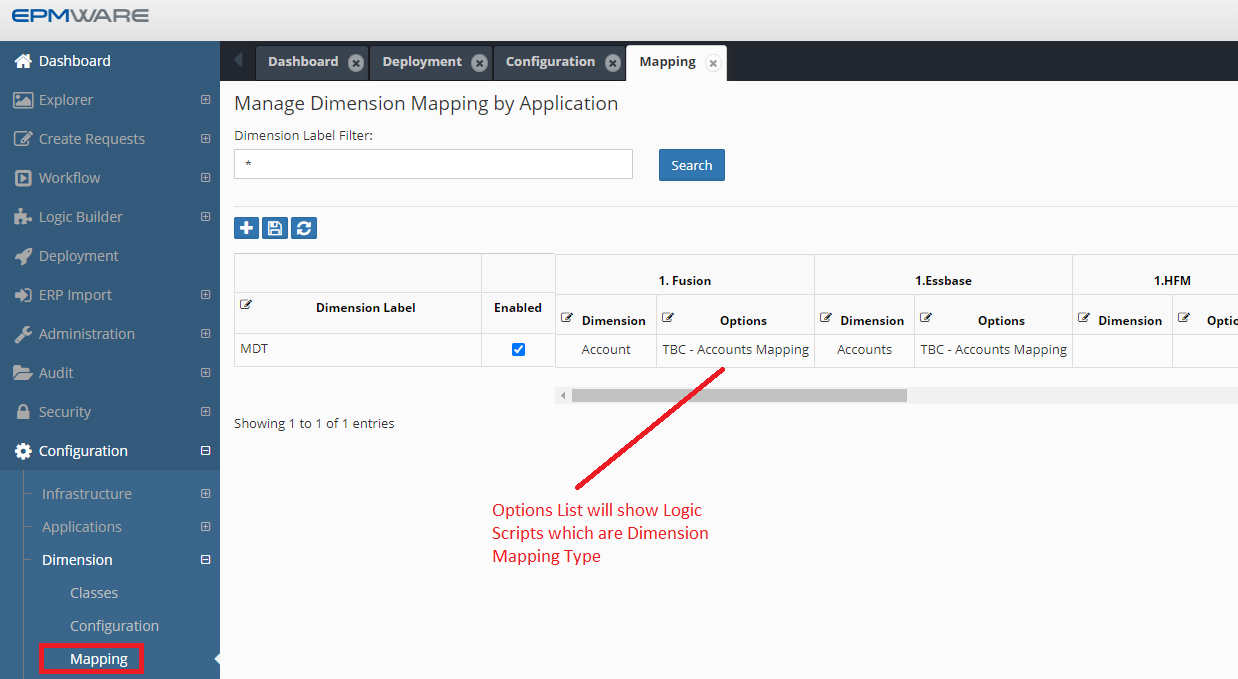
Step 2: Associate with Dimension Mapping

Navigate to Configuration → Dimension → Mapping:

Dimension Mapping Configuration Figure: Assigning Logic Script to dimension mapping configuration

Script Structure

Input Parameters

All input parameters are available through the ew_lb_api package:

Parameter Type Description Example
g_member_name VARCHAR2 Member being acted upon 'A10100'
g_parent_member_name VARCHAR2 Parent of the member 'A10000'
g_new_member_name VARCHAR2 New member name (for create actions) 'A10101'
g_action_code VARCHAR2 Hierarchy action code 'CMC', 'CMS', 'RM'
g_app_name VARCHAR2 Source application name 'HFM_PROD'
g_dim_name VARCHAR2 Source dimension name 'Account'
g_mapped_app_name VARCHAR2 Target application name 'ESSBASE_PROD'
g_mapped_dim_name VARCHAR2 Target dimension name 'Accounts'

Output Parameters

Set these parameters to control the mapping behavior:

Parameter Type Description Required
g_out_member_name VARCHAR2 Mapped member name Yes
g_out_parent_member_name VARCHAR2 Mapped parent name Yes
g_out_new_member_name VARCHAR2 New member for target For create/rename
g_out_ignore_flag VARCHAR2 Skip this action ('Y'/'N') Optional
g_status VARCHAR2 Success or Error status Yes
g_message VARCHAR2 Error message if failed On error

Action-Specific Logic

Create Member Actions

For create member actions (CMC, CMS), the behavior differs:

  • CMC (Create Member as Child): New member created under g_out_member_name
  • CMS (Create Member as Sibling): New member created after g_out_member_name under g_out_parent_member_name

Create Member Action Flow Figure: Create member action flow showing As Child vs As Sibling behavior

Example: Create Member with Prefix

DECLARE
  c_script_name VARCHAR2(100) := 'MAP_WITH_PREFIX';
  c_prefix      VARCHAR2(10)  := 'P_';

  PROCEDURE log(p_msg VARCHAR2) IS
  BEGIN
    ew_debug.log(p_text      => p_msg,
                 p_source_ref => c_script_name);
  END;

BEGIN
  -- Initialize status
  ew_lb_api.g_status  := ew_lb_api.g_success;
  ew_lb_api.g_message := NULL;

  log('Mapping action: ' || ew_lb_api.g_action_code || 
      ' for member: ' || ew_lb_api.g_member_name);

  -- Check action type
  IF ew_lb_api.g_action_code IN ('CMC', 'CMS') THEN
    -- Add prefix to all member names
    ew_lb_api.g_out_member_name        := c_prefix || ew_lb_api.g_member_name;
    ew_lb_api.g_out_parent_member_name := c_prefix || ew_lb_api.g_parent_member_name;
    ew_lb_api.g_out_new_member_name    := c_prefix || ew_lb_api.g_new_member_name;

    log('Created mapping: ' || ew_lb_api.g_out_new_member_name);

  ELSIF ew_lb_api.g_action_code = 'P' THEN
    -- Edit Properties
    ew_lb_api.g_out_member_name        := c_prefix || ew_lb_api.g_member_name;
    ew_lb_api.g_out_parent_member_name := c_prefix || ew_lb_api.g_parent_member_name;

  ELSE
    -- Other actions
    ew_lb_api.g_out_ignore_flag := 'Y';
    log('Ignoring action: ' || ew_lb_api.g_action_code);
  END IF;

EXCEPTION
  WHEN OTHERS THEN
    ew_lb_api.g_status  := ew_lb_api.g_error;
    ew_lb_api.g_message := 'Error in mapping: ' || SQLERRM;
    log('Exception: ' || SQLERRM);
END;

Rename Member Actions

For rename operations, map both the current and new names:

IF ew_lb_api.g_action_code = 'RM' THEN
  -- g_renamed_from_member_name contains original name
  ew_lb_api.g_out_member_name     := map_member(ew_lb_api.g_renamed_from_member_name);
  ew_lb_api.g_out_new_member_name := map_member(ew_lb_api.g_member_name);
END IF;

Move Member Actions

Move operations require special handling for source and target locations:

IF ew_lb_api.g_action_code = 'ZC' THEN
  -- g_moved_from_member_name: source parent
  -- g_moved_to_member_name: target parent
  ew_lb_api.g_out_member_name         := map_member(ew_lb_api.g_member_name);
  ew_lb_api.g_out_moved_to_member_name := map_member(ew_lb_api.g_moved_to_member_name);
END IF;

Insert Shared Member Actions

Shared member operations can involve multiple members:

IF ew_lb_api.g_action_code IN ('ISMC', 'ISMS') THEN
  -- g_shared_members_tbl contains list of members to share
  FOR i IN 1..ew_lb_api.g_shared_members_tbl.COUNT LOOP
    -- Map each shared member
    ew_lb_api.g_out_shared_members_tbl(i) := 
      map_member(ew_lb_api.g_shared_members_tbl(i));
  END LOOP;
END IF;

Advanced Mapping Example

Conditional Branch Mapping

This example maps members only if they belong to specific branches:

DECLARE
  c_script_name        VARCHAR2(50)  := 'BRANCH_BASED_MAPPING';
  c_mapping_lookup     VARCHAR2(100) := 'ACCT_DIM_MAPPING';
  l_found              VARCHAR2(1)   := 'N';

  CURSOR cur_branches IS
    SELECT lookup_code, meaning
    FROM   ew_lookup_codes_v
    WHERE  lookup_name  = c_mapping_lookup
    AND    enabled_flag = 'Y'
    AND    UPPER(tag)   = UPPER(ew_lb_api.g_app_name)
    ORDER BY lookup_code;

  PROCEDURE log(p_msg VARCHAR2) IS
  BEGIN
    ew_debug.log(p_text => p_msg, p_source_ref => c_script_name);
  END;

  PROCEDURE set_output_members IS
  BEGIN
    ew_lb_api.g_out_member_name        := ew_lb_api.g_member_name;
    ew_lb_api.g_out_parent_member_name := ew_lb_api.g_parent_member_name;
    ew_lb_api.g_out_new_member_name    := ew_lb_api.g_new_member_name;

    -- Handle move actions
    IF ew_lb_api.g_moved_to_member_name IS NOT NULL THEN
      ew_lb_api.g_out_moved_to_member_name := ew_lb_api.g_moved_to_member_name;
    END IF;
  END;

BEGIN
  -- Initialize
  ew_lb_api.g_status  := ew_lb_api.g_success;
  ew_lb_api.g_message := NULL;

  log('Processing: ' || ew_lb_api.g_member_name || 
      ' Action: ' || ew_lb_api.g_action_code);

  -- Check if member belongs to mapped branches
  FOR rec IN cur_branches LOOP
    log('Checking branch: ' || rec.lookup_code);

    IF ew_hierarchy.chk_primary_branch_exists(
         p_app_dimension_id   => ew_lb_api.g_app_dimension_id,
         p_parent_member_name => rec.lookup_code,
         p_member_name        => NVL(ew_lb_api.g_new_member_name, 
                                    ew_lb_api.g_member_name)
       ) = 'Y' THEN

      log('Member found in branch: ' || rec.lookup_code);

      -- Check if member exists in target
      IF ew_hierarchy.chk_member_exists(
           p_app_dimension_id => ew_lb_api.g_mapped_app_dimension_id,
           p_member_name      => ew_lb_api.g_member_name
         ) = 'Y' THEN

        l_found := 'Y';
        set_output_members();

      ELSE
        log('Member not found in target application');
      END IF;

      EXIT; -- Exit loop once found
    END IF;
  END LOOP;

  -- If not found in any mapped branch, ignore
  IF l_found = 'N' THEN
    ew_lb_api.g_out_ignore_flag := 'Y';
    log('Member not in mapped branches - ignoring');
  END IF;

EXCEPTION
  WHEN OTHERS THEN
    ew_lb_api.g_status  := ew_lb_api.g_error;
    ew_lb_api.g_message := 'Mapping error: ' || SQLERRM;
    log('Exception: ' || SQLERRM);
END;

Branch-Based Mapping Flow Figure: Branch-based mapping logic flow diagram

Testing Dimension Mapping Scripts

1. Enable Debug Logging

Add comprehensive logging to track script execution:

ew_debug.log('Input - Member: ' || ew_lb_api.g_member_name);
ew_debug.log('Input - Parent: ' || ew_lb_api.g_parent_member_name);
ew_debug.log('Input - Action: ' || ew_lb_api.g_action_code);
ew_debug.log('Output - Mapped Member: ' || ew_lb_api.g_out_member_name);

2. Test Scenarios

Test each action type:

Action Test Case Expected Result
Create Member Add new member in source Member created with mapping logic applied
Rename Member Rename existing member Both dimensions updated with new name
Move Member Move to new parent Member relocated in target dimension
Delete Member Remove member Member removed from target (if configured)
Edit Properties Change property values Properties synchronized per mapping rules

3. Verify Results

  1. Check Debug Messages report for execution logs
  2. Verify target dimension hierarchy matches expectations
  3. Confirm property values mapped correctly
  4. Review any error messages in failed mappings

Debug Messages for Mapping Figure: Debug Messages report showing dimension mapping execution

Common Issues and Solutions

Issue Cause Solution
Mapping not executed Script disabled or not associated Enable script and verify dimension mapping configuration
Member not found errors Target member doesn't exist Add existence checks before mapping
Duplicate member errors Member already exists in target Check for existing members before create
Performance issues Complex logic in loops Optimize queries, cache lookup data

Best Practices

  1. Always Check Member Existence: Verify members exist before attempting operations
  2. Handle All Action Codes: Include logic for all possible hierarchy actions
  3. Use Smart Sync Fallback: Call ew_hierarchy.set_dim_mapping_method for standard cases
  4. Log Extensively: Add debug logging for troubleshooting
  5. Test Thoroughly: Validate all action types and edge cases